
Introducing the ‘Game by game’ section of the Kognia platform
- 2 days ago
- 3 min read
Updated: 1 day ago
This latest update walks you through our ‘Game by game’ section, available in both the team and player profiles of our platform.
This component of our web-based app is designed for match analysis across both first-team and academy football, allowing users to interrogate tactical data that is synchronised with video footage at team and player level.

We've designed a workflow that centralises the post-match report and a personalised video playlist in a single point of the platform. No switching between tools. No wasted time navigating different parts of a platform. Just the information you need, exactly where you need it.
Focus on the games that matter
Within this section, users are able to view tactical metrics from the matches that are relevant. View performance across an entire season, home matches only, or in particular scenarios. For example, we can select the games where the player has played over 60 minutes, or matches that the team has won by more than one goal, for example. It may even be as straightforward as selecting only our home matches.
Within this, users are able to benchmark performance and output from that subset of matches against the overall output.
Access player reports directly within this section of the platform
The player report allows users to navigate through the different phases of the game via a range of tables, charts and graphics, breaking down performance with comparisons in absolute values, per 90 minutes, or benchmarked against the competition as a whole. It gives you the full picture, structured, visual and immediately actionable, all accessible by simply clicking on the game in question, and downloading the report immediately.
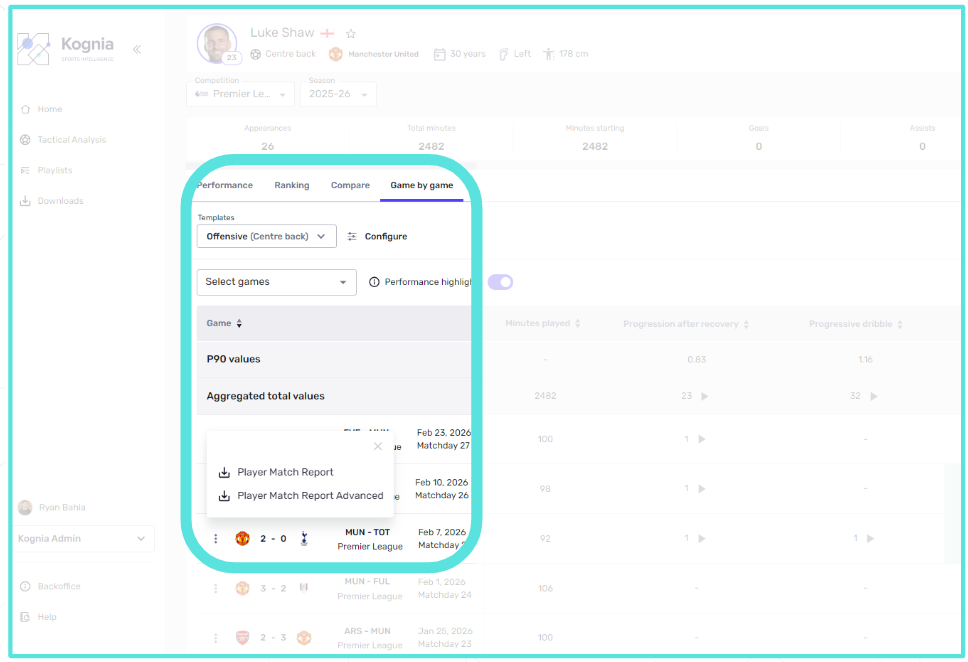
Work for a club? Get in touch to request a player report from one of your recent matches
Kognia match reports are available at both the team and the player level. For players, users have the option to view reports comprising on-the-ball data only, or more detailed reports that include Kognia tactical metrics.
In edition, when downloaded from accessed via the Team section of the platform, users have the ability to download multiple player reports at once, rather than having to take the time to download each one individually.

Export a player’s match XML data
This functionality in the Kognia platform provides a helpful and relevant option that aligns with club workflows that include multiple technologies.
Import a player profile into your own management system
Export and apply the data within high impact tools such as R and Python
Integrate Kognia tactical data within additional third party match analysis and visualisation tools
Club users can also download the XML file that includes only the tactical moments that are captured within in their player positional profiles, ensuring that they are able to focus on those relevant moments that are aligned with their objectives.
Ultimately, this functionality further enhances the ways our users can export data from the platform, adding to the options of CSV downloads, or via the Kognia API.

Video playlists that cover the moments that matter to you
The video playlist is automatically generated based on the metrics you select. Every clip has a clear purpose. Every sequence is there for a reason. No more scrolling through hours of footage hoping to find the moment that validates what the data is showing.
Users can bring these to life through the custom profiles that they create. If your winger profile includes runs in behind, crosses and exploiting gaps in opposition defences, these are the moments that will appear - chronologically - in each game that is selected.
Whether you are evaluating an academy talent, or reviewing a potential transfer target, a club analyst or coach can easily configure a position-specific post-match playlist and send it directly to stakeholders and colleagues across the club, ready to view immediately.
To book a product demonstration with Kognia, please get in touch.

Comments